Stefanie is a neurospicy🌶️ lover of art, automations, bubble baths, learning, music, and a crisp white wine. She is the founder of MoCo Marketing & SEO Ready™ Templates, and is the co-leader of Sisters in SEO Facebook group. Is your site SEO Ready™?
23 Ways to Improve Your SEO Without Editing Your Website Content
Most SEO advice starts and ends with your website. Update your page titles. Fix your meta descriptions. Write blog posts. Compress your images.
That SEO advice is not wrong, but it is incomplete.
Search engines and AI tools do not evaluate your website in isolation. They evaluate your entire digital presence: every profile, every listing, every mention, and every piece of structured data that confirms who you are, what you do, and where you do it.
Unfortunately, when those search-signals are missing or inconsistent, your rankings and AI citations suffer regardless of how well-written your website content is.
But when those signals are consistent and complete, search engines can identify your business as a real, distinct entity.
The consistency of those search-signals position you/your business as a trusted source of information.
Written by Stefanie Morris, SEO expert and marketing consultant and the founder of Morris & Co, this article documents the off-site, on-platform, and authority-building activities that directly affect how search engines and AI tools identify and rank your business, none of which require you to open your website editor.
How do I know this works?! Well, before founding Morris & Co, I (Stefanie) spent nearly a decade working as a destination wedding photographer, using SEO to book weddings across the Eastern Seaboard in cities where I had no local presence…including Boston, Newport, and Aruba. My professional background and daily experience serving clients across the US, informs every recommendation in this post.
Before You Do Anything: Understand Why Consistency Is the Mechanism
Search engines confirm your business identity by cross-referencing information across sources.
The sources they’re checking? Your website, the business address in your privacy policy, your Google Business Profile, your directory listings, your social profiles, and your schema markup all feed into this process.
So when your business name, address, phone number, and specialty are read identically across those sources, search engines assign higher confidence to your entity data.
When Google has high confidence in your business entity information, it trusts you as reference.
And when you’re trusted, you’ve just captured one of the precious E-E-A-T search signals & you’re more likely to come up in relevant searches!
However, when those sources conflict, that confidence drops=no trust.
AI tools operate the same way. When ChatGPT, Google’s AI Overview, or Perplexity generates an answer that includes your business, it draws from structured, consistent, cross-referenced data. Inconsistency does not just hurt your traditional rankings. It reduces the likelihood that AI tools cite you at all.
Every step in this post builds on the search signal mechanism of trust, which is foundational to all SEO/GEO efforts.
Follow the steps below in the order presented to save yourself headache & time. Each step creates the stable foundation the next step requires.
Being a trusted source to search engines & LLMs is a key foundation of traditional SEO/GEO. It is what gets you into search results!
Stefanie Morris
Step 1: Establish a Publishable Business Address
If you work on location, as most live wedding painters, photographers, and artists do, your business address is likely your home address. Using & publishing your home address on your Google Business Profile, your website, and a dozen directory listings could create obvious privacy and security concerns.
While you can hide your address on a Google Business Profile, the privacy policy on your website (yes it’s required) has to include your business address – and that is public.
If that is a concern for you, the solution is likely a virtual mailbox service, which provides a real commercial street address that can be publicly listed as your business address.
Decide If You Need a Virtual Mailbox
If you are concerned about privacy or security and work from home, this might be the right choice for you.
You’ll need to sign up for a virtual mailbox service and confirm your new address before you touch any profile, listing, or schema setting.
NOTE: You cannot verify a Google Business Profile with a PO Box; it has to be a real address that you can visit & show a presence at.
Check that your virtual mailbox meets the requirements for using it on a Google Business Profile before you sign-up for this type of service!!!
A virtual mailbox address is not a P.O. box. It is a real street address at a staffed commercial facility. You can list it as a “by appointment only” business address on every profile, in your schema markup, and in your website footer.
Virtual Mailbox is a service that offers both virtual and physical addresses (what they call a “TruLease”). I’m not affiliated with this company, but this does help explain the difference between these services.
The address you establish here will be used in every subsequent step. Changing it later means auditing and correcting every platform you already updated.
Step 2: Off-Site Profiles and Platforms
The activities in this step establish and confirm your business identity across the external platforms that search engines reference when building their understanding of who you are.
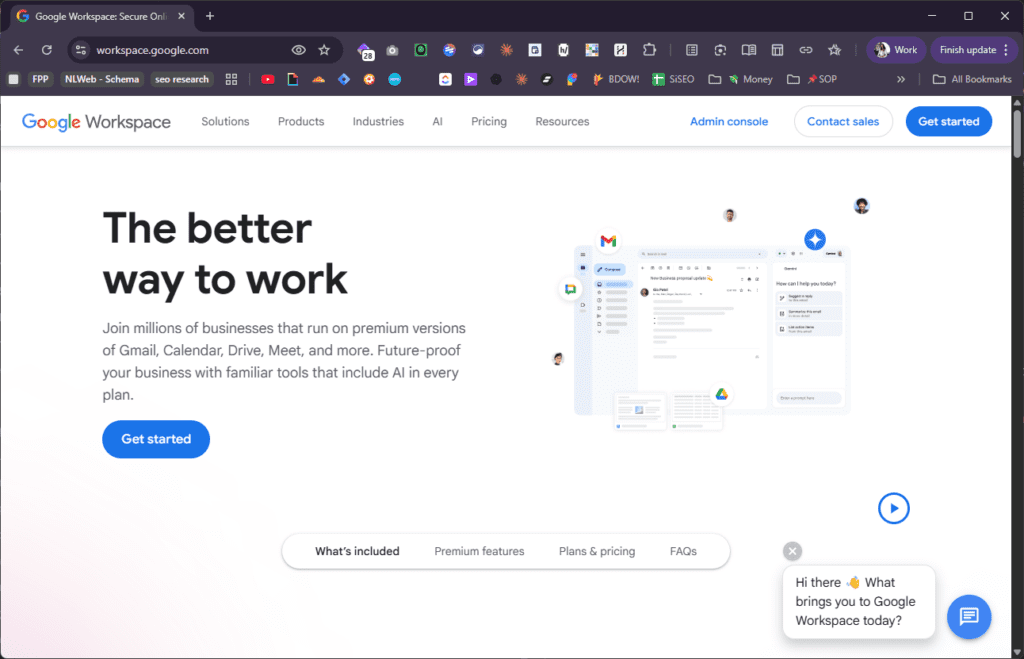
Activity 1: Set Up Google Workspace With a Custom Domain Email
Did you realize that even your email address is a trust signal to spam filters, to clients, and to search engines?
Sending inquiries and proposals from a Yahoo, Gmail, or platform-generated inbox signals to spam filters that your message is not coming from a verified business domain, because it is not.
You do not own those domains. Without the ability to set the DNS records that authenticate your sender identity, you cannot do anything to keep your emails out of spam filters.
Google Workspace provides a professional email address on a domain you own, yourname@yourstudio.com, for approximately $7 per month. It also gives you the ability to set the three DNS authentication records that determine whether your emails reach inboxes.
Do not buy/setup a Google Workspace account via GoDaddy, Wix, Squarespace, etc…
Activity 2: Configure SPF, DKIM, and DMARC Records
These three DNS records are set at your domain registrar (GoDaddy, Namecheap, Squarespace Domains, etc.) after you set up Google Workspace. Google provides the exact values to paste in, and this is a one-time setup.
At this point you may still be asking, what are the DNS records that impact business email deliverability?
There are 3 types of DNS records that impact most email deliverability: SPF, DKIM, and DMARC.
SPF (Sender Policy Framework)
Confirms that the server sending your email is authorized to send on behalf of your domain.
DKIM (DomainKeys Identified Mail)
Applies a cryptographic signature to every outgoing message so the receiving server can verify the message is genuine.
DMARC (Domain-based Message Authentication, Reporting, and Conformance)
Tells receiving servers what to do if SPF or DKIM fail, and sends you reports if someone attempts to spoof your address.
Once you’ve completed your professional email setup, your emails will now carry verifiable sender identity. This means that it’s much more likely that proposals and inquiry responses land in inboxes rather than spam folders!
Activity 3: Set Up and Fully Complete Your Google Business Profile
Your Google Business Profile is the single most impactful free tool available to a local service business. It directly affects your placement in Google’s local map results and your knowledge panel in search.
Fill in every available field:
Business name
Service area (cities and regions you serve)
Phone number
Website URL
Business hours
Business category
Business description
For live wedding painters: upload photos of finished paintings in wedding settings, in-progress ceremony shots, and completed portraits. Add new photos consistently, not just at setup.
Category note: There is no “Live Wedding Painter” category in Google Business Profile at the time of publication. Select “Artist” or “Art Studio” as your primary category, and write a business description that includes the phrase “live wedding painter” and the cities and regions you serve.
Use the address you established in Step 1!
Google My Business is free, and it is available to every single person reading this.
Stefanie Morris
Activity 4: Post Regularly to Your Google Business Profile
Your Google Business Profile is not a static listing. It is a publishing platform with its own content feed. Google’s algorithm treats an active, regularly updated profile differently than an inactive one.
Post when you:
When you are at a wedding painting/photographing – create a post while you’re there to take advantage of Geo-data
After you’ve photographed/painted a new wedding
Post about open availability for a specific season or destination
Post if you have a recent vendor/venue photo or reference photo (artists) worth sharing
Include the venue name and location in every caption. These posts reinforce your location and specialty signals directly inside your profile.
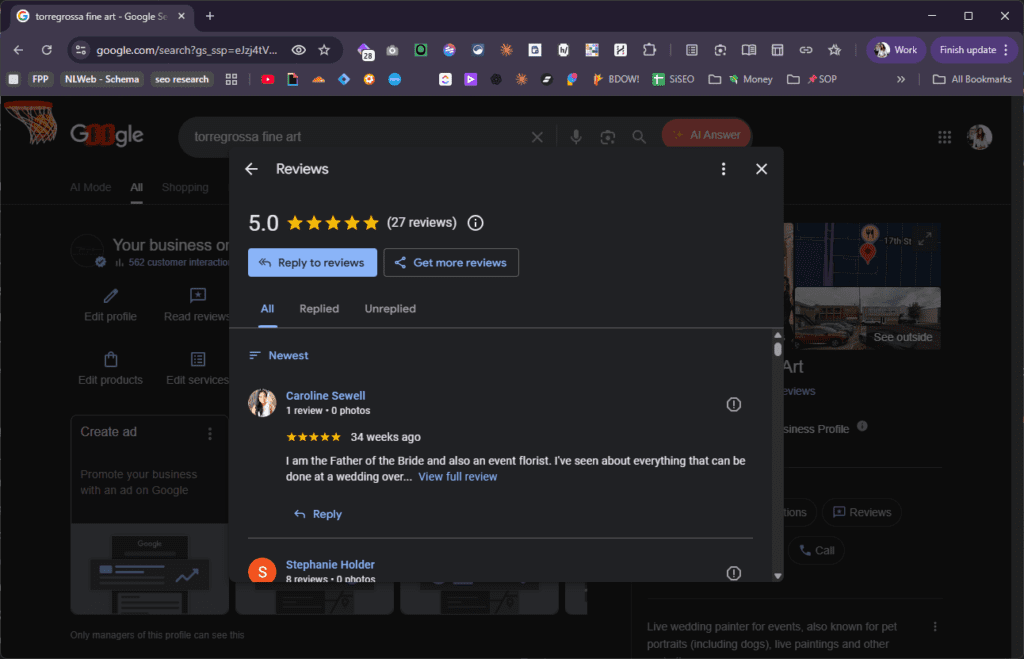
Activity 5: Request and Respond to Google Reviews
Google reviews are a direct ranking factor in local search results. Five genuine reviews from real clients carry more local ranking weight than hundreds of Instagram followers.
Use the ‘Get more reviews’ button to generate a direct link to use in review request texts & emails to clients.
How to ask:
Take a good photo of your finished painting and send it with a request that includes the direct link to your Google review page after you deliver their finished painting
Make the request specific: ask them to share their experience on Google and give them the link directly
Ask wedding planners who regularly refer you as well; their language about your work signals authority within the wedding industry specifically.
Respond to every review, positive and negative. Responses signal to search engines that the profile is actively managed.
Highlight the client’s experience with you, not your experience with the client.
Stefanie Morris
Activity 6: Verify Your Site in Google Search Console
Google Search Console is a free tool that confirms to Google that you are the verified owner of your website.
It also shows you:
Which search queries are driving traffic to your site
Which pages are indexed
Whether any technical issues are preventing Google from reading your content
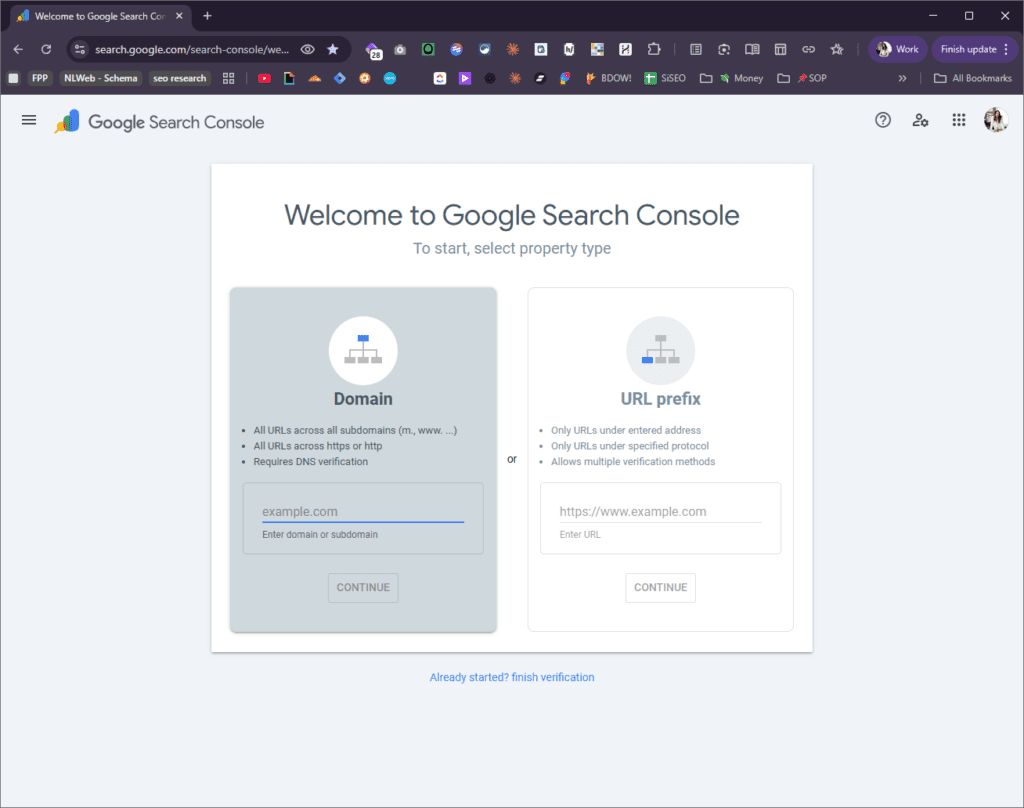
Step 1: Login to your newly created business email account Step 2: Click this link to verify your site at search.google.com/search-console.
You want to verify the ‘Domain’ – not the ‘URL prefix’.
Search Console verification is done through a DNS record or an HTML tag added to your site settings.
Activity 7: Verify Your Site in Bing Webmaster Tools
Bing Webmaster Tools performs the same function as Google Search Console, but for Microsoft’s search engine and for Bing-powered AI tools including Microsoft Copilot.
Bing’s data feeds directly into AI tools that your prospective clients may be using when they research vendors.
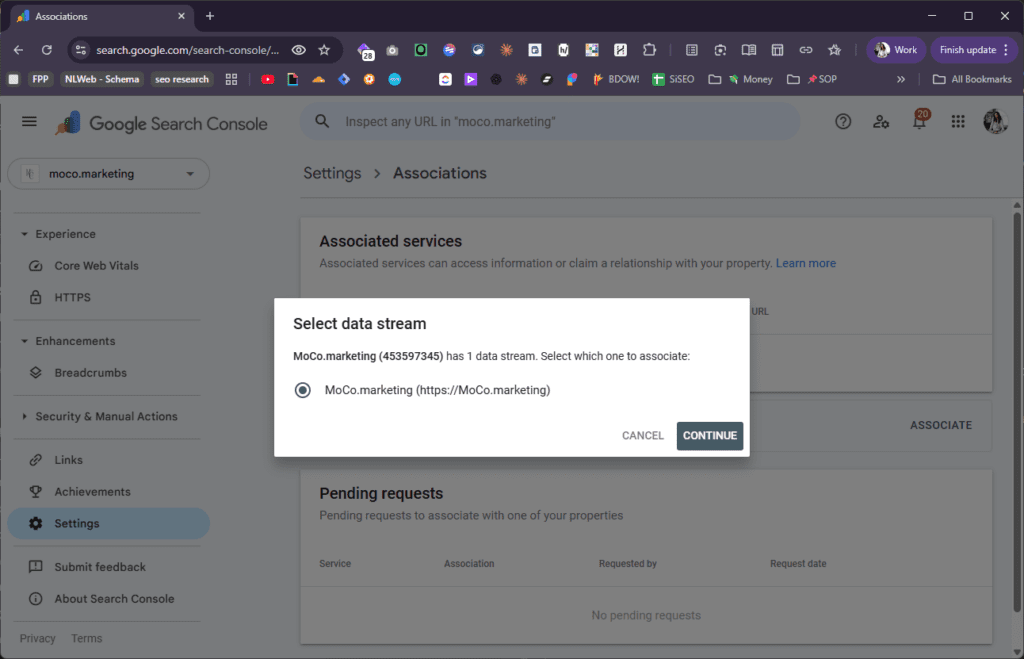
Activity 8: Connect Google Search Console to Google Analytics
Google Analytics (GA4) tracks how users behave on your website. Google Search Console tracks how your site performs in search results.
Connecting the two gives you a complete picture:
Which search queries brought someone to your site
Which page they landed on
What they did after they arrived
Make this connection inside your Google Analytics property under Admin > Search Console Links. Or in Search Console under Settings > Associations > Associated Services.
Activity 9: Claim and Update Your Wedding Industry Directory Profiles
The Knot, WeddingWire, and Style Me Pretty are the three wedding industry directories that carry the most authority with search engines and AI tools.
Each one that lists your business name, address, phone number, website URL, and specialty description is a cross-reference point that confirms your entity data.
On each profile, confirm:
Business name matches your Google Business Profile exactly
Address matches your virtual mailbox address exactly
Phone number is consistent across all profiles
Website URL is current and correct
Business description includes “live wedding painter” and your service region
Word-for-word consistency on your business name and address is what matters.
Activity 10: Audit All Existing Listings for Consistency
Before you add any new profiles, audit the ones that already exist. Search your business name and your personal name in Google. Note every directory, listing site, or platform that surfaces a result. Check each one for accuracy.
Common inconsistencies to correct:
Old phone numbers or email addresses
A previous business name or studio name
A home address that predates your virtual mailbox
A missing or outdated website URL
A business description that no longer reflects your current specialty or service area
Every inconsistency is a signal conflict. Search engines encountering two different addresses for the same business name have to decide which one is correct, and they may decide neither is trustworthy.
Inconsistency confuses both traditional search engines and generative search – AI tools.
Stefanie Morris
Activity 11: Update Your Social Profile Bios
Your Instagram, Facebook, Pinterest, and LinkedIn bios are publicly indexed. Search engines read them, and AI tools reference them.
Your bios should state:
Your specialty in plain terms: “live wedding painter,” not just “artist” or “painter”
Your home city or region
The regions or types of venues you serve
This language should match the language on your Google Business Profile and your website.
Activity 12: Set Up Pinterest as a Business Account With Your Website Verified
Pinterest is a visual search engine.
For live wedding painters, it is also one of the strongest referral traffic sources available. Couples planning weddings actively use Pinterest to research vendors and save inspiration.
A business account gives you:
Access to Pinterest Analytics
The ability to claim and verify your website
Claiming your website on Pinterest creates a verified link between your Pinterest presence and your domain. This cross-reference confirms your entity to search engines and drives referral traffic from users who save your painting images.
Activity 13: Update Your LinkedIn Profile
LinkedIn profiles rank in Google search results.
When someone searches your name, your LinkedIn profile frequently appears on the first page.
Update your LinkedIn:
Headline: include “live wedding painter” and your studio name
About section: include your service region and specialty in the opening lines
Experience: list your studio name, your role, and the date you founded or joined
LinkedIn also signals professional credibility to AI tools that draw from professional network data when generating answers about service providers.
Step 3: On-Platform Setup Inside Your Website Tools
The activities in this step configure the technical infrastructure inside your website platform. None of them require editing visible page content.
Activity 14: Set Up Your WordPress Author Account Correctly
Your Showit website runs on WordPress for blog content. Within WordPress, your author account controls how your name appears on every published page & post.
Your author attribution connects your blog content to your identity as an expert, and that connection is what search engines use to assign content authority.
Setting up a correct authorship user with a correct FirstName LastName and your business email address is vital for correct attribution.
Your WordPress author account should have:
Display name in “FirstName LastName” format, not “admin,” not your studio name, not a system-generated username
Email address set to your Google Workspace domain email
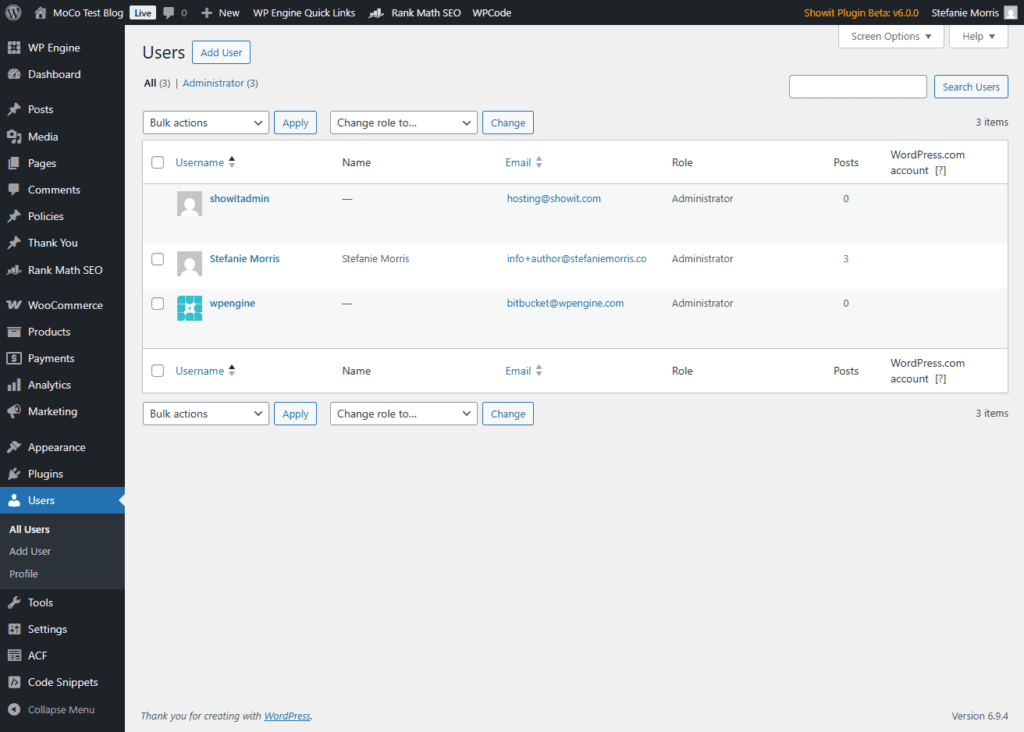
In your WordPress dashboard: Users > Add User > create a new user with the correct FirstName LastName (use a space between the two names in the ‘username’ field) and correct business email address.
Showit does not allow you to fix or change the username, so you must add a new user with admin permissions; once you sign in as this new admin user, you can delete your old/original admin user – assign the content you created as that user to your new, correct, admin user.
Activity 15: Update Your Showit Social Links
Showit stores your social profile URLs in your Site Settings under the Social tab. These links are associated with your site’s schema markup and feed into how search engines map your online presence as an entity.
Fill in every social profile URL that applies:
Instagram
Pinterest
Facebook
YouTube
LinkedIn
These links tell search engines that your website, your Google Business Profile, and your social profiles all belong to the same entity.
Activity 16: Configure Rank Math Schema Settings
Rank Math is the SEO plugin that handles structured data for most Showit/WordPress sites. Structured data is code that explicitly tells search engines and AI tools what type of entity your website represents, what services you offer, where you are located, and who you are.
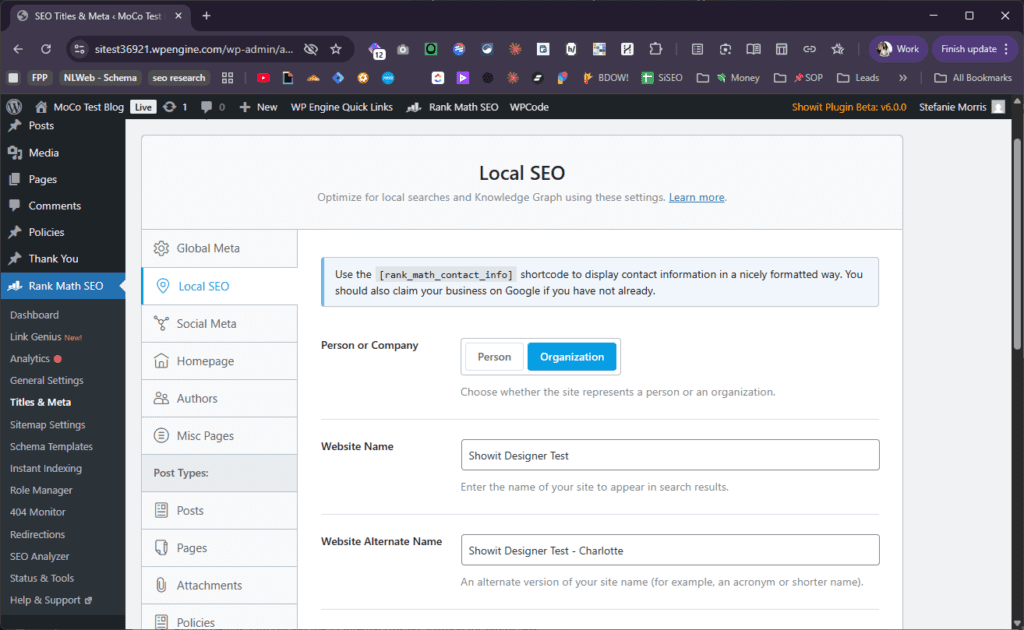
In Rank Math: Titles and Meta > Local SEO
The two most consequential settings:
Person or Organization
If you’re a live wedding painter or photographer who runs a business entity, select “Organization.”
Website Name
Enter your studio name exactly as it appears on your Google Business Profile and directory listings.
If there’s a field for information about your business, fill it in.
Fill in your business address using your business mailing address/virtual mailbox address.
Fill in your phone number.
These fields generate the LocalBusiness schema that both search engines & AI tools read when answering questions about service providers in your area.
Activity 17: Set Up Your Gravatar Profile
Gravatar is a globally recognized avatar service owned by Automattic, the company behind WordPress.
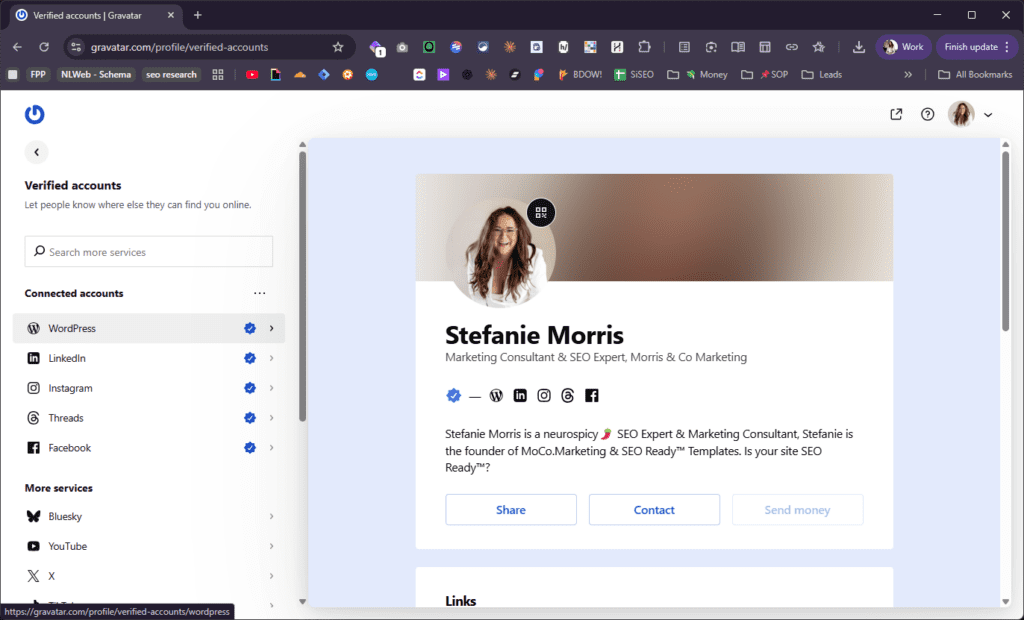
It ties your profile photo and bio to your email address across the web. When your domain email is the author email in your WordPress account, your Gravatar profile photo and bio appear on your published blog posts.
Setup steps:
Go to gravatar.com
Create a profile using your Google Workspace domain email
Upload a professional headshot (the same photo you use on your Google Business Profile and social profiles)
Write a short bio that includes your name, your specialty (“live wedding painter”), and your location
Follow the instructions to add a verified link to your WordPress website (most important step)
This confirms the same photo, name, and bio connected to your content across multiple platforms, which is a meaningful entity signal.
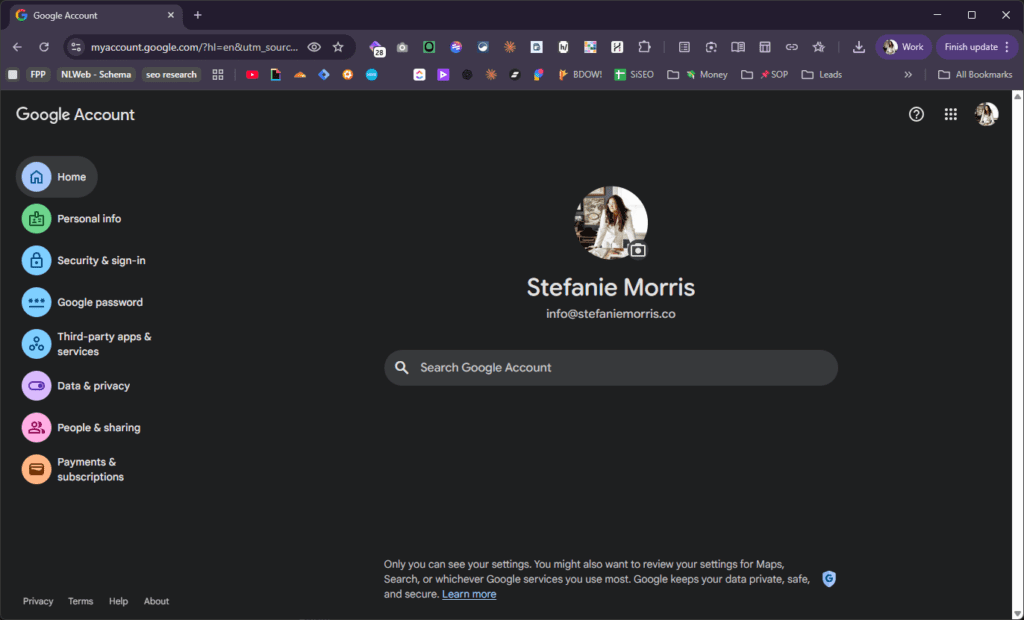
Activity 18: Update Your Personal Google Account Profile
Your personal Google Account profile, separate from your Google Business Profile, feeds into how search engines understand you as an individual entity. This matters for AI tools in particular. When someone asks an AI tool about live wedding painters in your city, the tool may draw from both your business entity data and your personal entity data.
Full name (consistent with how your name appears everywhere else)
Profession (“Live Wedding Painter” or your specialty as stated on your other profiles)
Bio (consistent specialty language and location)
Bonus Step 4: Build Authority Through External Mentions
The activities in this step are ongoing practices that build your authority as a recognized entity in the wedding industry. Each one generates an external mention of your name, your business name, and your specialty on a platform that carries authority with search engines.
These activities are separated as a bonus step because they require a different type of effort than the profile and platform setup in Steps 1 through 3. They are relationship-based, submission-based, and ongoing.
They also feed directly into GEO, which is the practice of getting cited in AI-generated answers. AI tools cite entities that are mentioned across multiple authoritative sources. The more authoritative external sources that mention your name alongside “live wedding painter” and your service area, the more likely AI tools are to surface you in relevant answers.
Activity 19: Submit Real Weddings to Wedding Blogs and Publications
Wedding blogs and publications that feature real weddings publish vendor credits. Each vendor credit that includes your studio name, your specialty, and a link to your website is a citation that search engines and AI tools read as an authority signal.
Submit weddings to publications whose audience matches the type of couple you want to book. A feature on a publication that covers luxury venues in your region carries more weight for local and AI search than a feature on a general-interest wedding blog with no geographic focus.
Activity 20: Submit Styled Shoots to Publishers Who Tag Vendor Credits With Links
Styled shoots are editorial collaborations where vendors produce wedding imagery that reflects a particular aesthetic or concept. Publications that cover styled shoots typically publish full vendor lists with links.
Each linked credit is a backlink from an authoritative domain.
When submitting, confirm with the publication how vendor credits are formatted. A linked credit with your studio name and specialty stated plainly (“live wedding painting by [Studio Name]”) delivers a stronger entity signal than an unlinked mention.
Activity 21: Pursue Podcast Appearances That Generate a Published Episode Page
When you appear on a podcast, most publishers create a dedicated episode page that includes:
Your name
Your bio
A link to your website
A description of your specialty
That page is a publicly indexed document that confirms your identity as an expert in your field. The episode page, not the audio itself, is what delivers the SEO and GEO value.
Target podcasts whose audience includes engaged couples, wedding planners, or other creative industry professionals. Confirm before recording that the publisher creates a full episode page with show notes and a linked bio.
Activity 22: Submit to Venue Preferred Vendor Lists
Wedding venue preferred vendor lists are among the highest-authority citations available to wedding industry professionals. They are published on venue websites, which are authoritative local domains. They are also the source that wedding planners and couples reference most often when building their vendor teams.
Contact the venues where you have painted and request inclusion on their preferred vendor list.
Provide:
Your studio name
Your specialty stated plainly (“live wedding painter”)
Your website URL
A professional photo
Consistent inclusion on multiple venue preferred vendor lists in your region confirms your presence and authority in that market to both search engines and AI tools.
Frequently Asked Questions
Do I need to complete all of these steps before I see any results in search?
No. Each step contributes independently. Setting up your Google Business Profile correctly and consistently requesting Google reviews will affect your local search placement on its own. That said, the steps in this post build on each other. A virtual mailbox address established in Step 1 makes every profile update in Step 2 more consistent and therefore more effective. Working through the full list produces compounding results that individual actions cannot replicate.
How long does it take for these changes to affect my search rankings?
Off-site profile updates and listing corrections can take two to eight weeks to be re-crawled and reflected in search results. Schema changes are typically picked up faster, sometimes within days of being indexed. Google Business Profile updates are usually reflected within a week.
The generative-search activities in this post build a foundation that compounds over time.
Do these activities apply to AI search tools like ChatGPT and Perplexity, or only to Google?
They apply to both. AI tools and traditional search engines draw from the same categories of data: structured schema markup, consistent business listings, authoritative external mentions, and verified profiles. The activities in this post address all of those categories. Steps 1 through 3 are particularly relevant to AI citation because they establish consistent, machine-readable entity data across multiple sources, which is exactly what AI tools use to decide whether to cite a business in a generated answer.
What is the difference between a Google Business Profile and a personal Google Account profile?
A Google Business Profile is a public listing that appears in Google Maps and local search results. It represents your business as an entity. A personal Google Account profile is your individual identity on Google’s platform and feeds into Google’s understanding of you as a person separate from your business. Both contribute to entity recognition in search, and both should reflect consistent specialty language and location information.
What is a virtual mailbox and why is it different from a P.O. box?
A virtual mailbox is a service that provides a real commercial street address at a staffed facility. Mail received at that address is scanned and accessible through an app or web portal. A P.O. box is a number at a post office and is not accepted by Google Business Profile for address verification. A virtual mailbox address meets Google’s requirements, can be listed as a “by appointment only” business address, and provides a professional, publishable address that protects your personal privacy.
Stefanie Morris is the founder of Morris & Co — known as MoCo.Marketing, an SEO and marketing consultancy based in Rock Hill, SC. Morris & Co provides done-for-you SEO for creative entrepreneurs and independent law firms, with specializations in WordPress SEO, Showit SEO, image SEO, and generative engine optimization.
Stefanie spent nearly a decade working as a destination wedding photographer before founding Morris & Co, during which she built SEO systems that produced bookings in markets including Boston, Newport, and Aruba from a home base in Charlotte, NC.
Share This Post:
Reply...
About the Author
Stefanie Morris
Stefanie Morris is a SEO expert and marketing consultant. She spent nearly a decade working as a destination wedding photographer before founding Morris & Co. Marketing & SEO Ready™ Templates.
As a photographer, Stefanie learned & built SEO systems that resulted in wedding bookings all across the Eastern US, in markets including: Charleston, Savannah, Boston, Long Island, Newport, and even Aruba.
Today, she brings her search engine optimization and marketing experience to life for creative entrepreneurs, innovative law firms, and wedding industry professionals.
From website migrations, to website to design, to specialized SEO services including: WordPress SEO, Showit SEO, image SEO, and more, Stefanie and her team are here to help you with all of your website & generative search engine optimization needs.
For Stefanie, there's really only one question: is your site SEO Ready™?
The content on this website and our resources is for general informational and educational purposes only and should not be construed as professional advice.
Morris & Co. Marketing makes no warranties or guarantees regarding the accuracy, completeness, or currency of the information provided. For guidance specific to your situation, please consult a qualified professional in the relevant field. Review our disclaimers & policies here.
Disclaimer
The Art of SEO, Hidden Gems for Creative Entrepreneurs
If you've ever wondered why your website isn't showing up on Google, this is where to start. In this interview I walk through the SEO fundamentals that most creative entrepreneurs miss, and exactly what to do about them.