





Estimated reading time: 7 minutes
Originally published February 21, 2023. Updated October 6, 2026.
5 ChatGPT Prompts for Wedding Photographers, Plus 50 Ways to Use ChatGPT
ChatGPT can plan blog posts, review your services page, and write page titles and alt text for your wedding photography website, as long as you give it your real business details and check what it hands back. This guide gives you five prompts for website and SEO work, four bonus prompts, and 50 ways to use ChatGPT across inquiries, client communication, and marketing.
I spent nearly a decade as a destination wedding photographer before I founded Morris & Co. Marketing. I first published this post in February 2023, when most of us asked ChatGPT to invent content from a venue name and little else. I write prompts differently now, and every screenshot below comes from a real ChatGPT session I ran with sample details.
Give ChatGPT your facts before you ask for a draft
ChatGPT fills every gap in a prompt with something that sounds plausible. In the 2023 version of this post, I asked it for ten blog post ideas about a Charlotte wedding venue. It suggested a venue history, a spotlight on the venue’s preferred vendors, and a guide to its reception spaces. None of those posts could be written from what I gave it.
Key idea: ChatGPT writes from what you give it. Your notes, your services, and your client questions are the raw material, and ChatGPT organizes them.
OpenAI’s prompting guidance for ChatGPT recommends clear, specific prompts with enough context to remove ambiguity, then refining the prompt once you see the response. For a wedding photographer, context means where you work, what you offer, who you want to book, and what happened on the wedding day.
Use every prompt in this guide the same way:
- Copy the prompt and replace each bracketed detail with your own information.
- Paste two or three paragraphs of your own writing when you want the draft to sound like you.
- Send the prompt and read the full response.
- Reply in the same chat with corrections instead of starting over.
- Check every fact, name, and number before anything goes on your website.
That last step matters for search as well as accuracy. Google’s guidance on generative AI content tells site owners to review AI output, including page titles, meta descriptions, and alt text. Google’s spam policy on scaled content abuse also covers sites that publish many pages with AI tools without adding value.
Note: Share only details the couple has approved for public use. Names, contact information, and private family details rarely help a draft.
ChatGPT prompts for your wedding photography website and SEO
Each of the five prompts below handles one website task. Use the table to find the one you need today.
| Prompt | Use it when |
|---|---|
| 1. Plan blog posts | You don’t know what to write next |
| 2. Real wedding blog post | You just photographed a wedding |
| 3. Services page review | Visitors leave without inquiring |
| 4. Titles and meta descriptions | A page is written and ready to publish |
| 5. Alt text and file names | You are adding portfolio images |
Prompt 1: Plan blog posts around your services and client questions
Use this prompt when you need to decide what to write next. It works best with real questions from your inquiry emails and consult calls. A Charlotte wedding photographer might paste in questions about rainy day portraits, how long family photos take, and whether reception coverage includes the send off.
Help me plan useful website content for my wedding photography business.

Business name: [name]
Home location and service areas: [city, state, and areas served]
Services offered: [weddings, elopements, engagement sessions, etc.]
Couples I want to reach: [describe their plans and priorities]
Questions couples ask me: [paste questions from inquiries and consults]
Existing website pages and blog posts: [paste titles and URLs]
Optional Google Search Console data: [paste relevant queries, pages, impressions, and clicks]

Recommend five content ideas that fit my actual services and knowledge. For each idea, give a working title, the reader's main question, a search phrase to research, the existing page it could link to, and the information I should add from my own experience.

Point out any overlap with my existing content. Label search phrases as suggestions unless my data supports them. Use only the metrics I supplied. Flag missing information instead of inventing it.
Note: ChatGPT cannot see your Search Console data unless you paste it in, and it cannot tell you how often couples search a phrase. Check its suggestions with the SEO tools covered later in this guide.
Prompt 2: Turn your wedding day notes into a real wedding blog post
Use this prompt after you photograph a wedding. Include the decisions you made along with the visual details, such as moving portraits indoors when rain started or shortening the family photo list to protect sunset time. Those details give future couples useful context, and they show readers and search engines that the post comes from someone who was there.
Draft a real wedding blog post for my wedding photography website using only the notes below.

Business and photographer: [name]
Venue and location: [venue, city, state]
Details the couple approved for public use: [details]
My notes from the day: [what happened, lighting, portrait locations, schedule decisions, and how I worked]
Observations that would help future couples: [observations]
Relevant pages on my website: [URLs and what each page covers]
Writing sample: [paste two or three paragraphs I wrote]

Write a descriptive title, a short introduction, and clear sections that explain the day and the planning lessons it offers. Keep each paragraph focused on one idea. Suggest internal links using only the URLs I provided. End with an invitation to ask about my wedding photography availability.

Use my notes as the only factual source. Mark missing details as [confirm]. Do not invent quotes, emotions, venue policies, vendor names, or claims about my experience. Separate what happened at this wedding from advice that depends on each couple's plans.
Here is the prompt filled in with sample notes from a rainy October wedding in Charlotte:
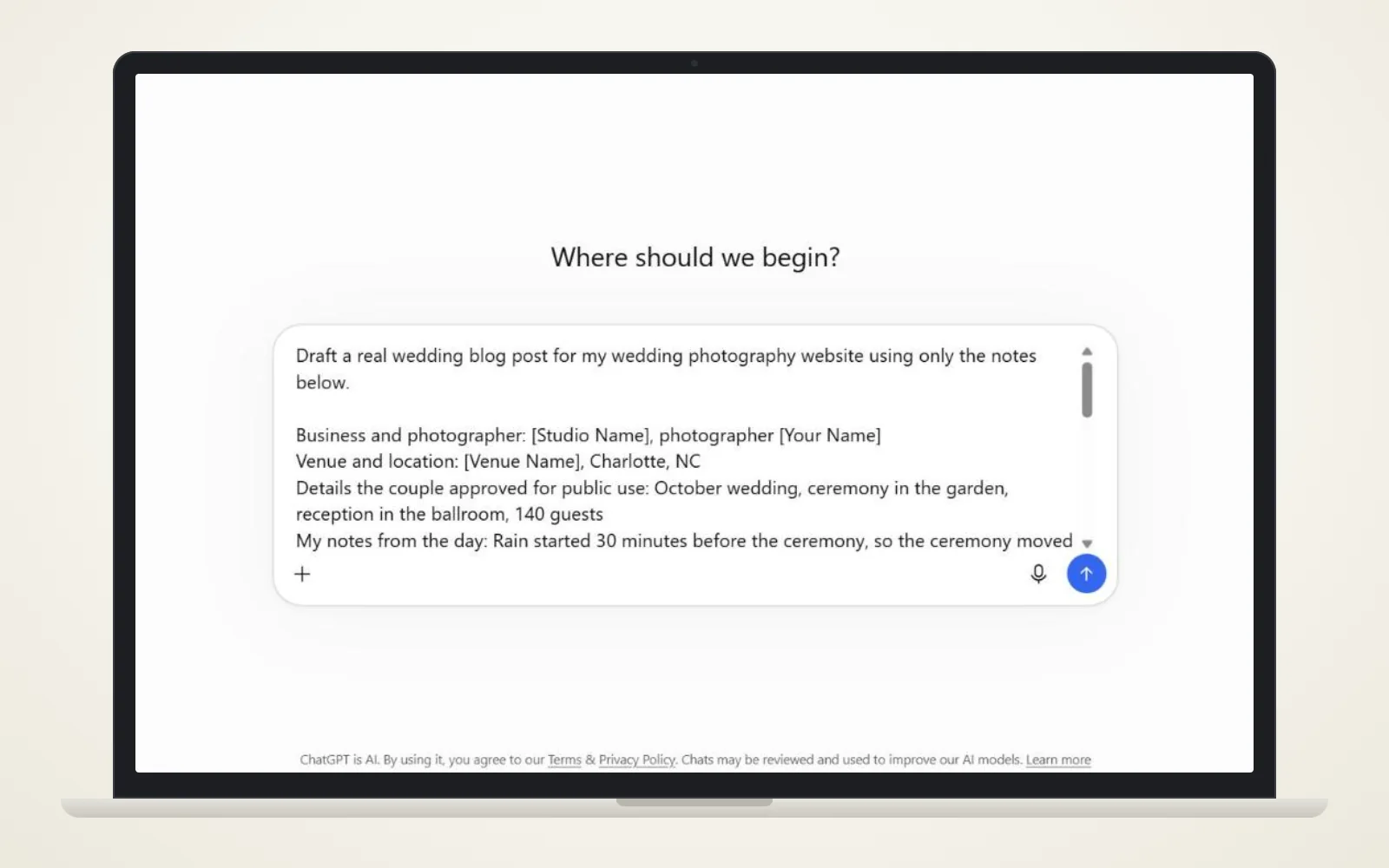
ChatGPT kept to the notes. The draft names the covered terrace, the 6:10 PM break in the rain, and the 12 family groups in 25 minutes, and it links only to the two pages supplied in the prompt.

After ChatGPT answers:
- Read the draft beside your notes and your gallery.
- Confirm names, dates, locations, and any planning advice.
- Add details only you know, such as how you directed the couple or why you chose a spot.
- Rewrite any sentence that sounds unlike you.
Prompt 3: Review your services page from a couple’s point of view
Use this prompt when your website gets visitors and few of them inquire. A review often shows that a services page describes your photography style but leaves out where you work, a starting price, what coverage includes, or what happens after someone inquires. Our post on wedding photographer website mistakes covers these gaps in more detail.
Review the wedding photography services page below from the point of view of a couple deciding whether to inquire.

My services: [details I have confirmed]
Location and travel availability: [details]
Current pricing information: [starting price or range and what it includes]
Booking process: [the actual steps]
Couples I want to reach: [description]
Page text: [paste the complete page copy]
Writing sample: [optional]

Identify the five most important gaps or unclear statements. For each one, explain the question it leaves unanswered and suggest a specific change.

Then rewrite the introduction and the inquiry invitation using only the facts I supplied. Keep the language clear, specific, and natural. Keep my pricing and service details accurate. Mark anything that needs my confirmation. Do not invent guarantees, testimonials, credentials, or package features.
After ChatGPT answers:
- Make the changes you agree with on your live page.
- Open the page on your phone.
- Check that a couple can find your pricing, location, coverage, and inquiry link without hunting.
- Submit a test inquiry to confirm the form works.
Prompt 4: Write page titles, headlines, and meta descriptions
Use this prompt after you finish writing or revising a page. Paste the final copy so the title and description match what visitors will find. A real wedding post should name the venue and city when that is accurate, and a services page should state the service and the area you serve.
The 2023 version of this post asked ChatGPT to make a headline “more compelling,” and it returned “Discover the Perfect Season for Your Dream Wedding.” That headline could belong to any venue in any city, so this prompt asks for specific names and places.
Write SEO page titles, H1 headlines, and meta descriptions for this page on my wedding photography website.

Page type: [services page, real wedding post, venue guide, About page, etc.]
Business name: [name]
Page URL: [URL]
Main topic and location: [details]
Complete page copy: [paste copy]

Give me three sets, each with a page title, an H1 headline, and a meta description. Make each set specific to this page and useful to a couple looking for a wedding photographer. Include the business name in the page title where it fits.

Aim for page titles of about 50 to 60 characters and meta descriptions of about 140 to 160 characters, and show the character count for each. Keep names and locations accurate, write in natural language, and do not repeat keywords or make claims the page does not support.
When I ran this prompt for a sample Charlotte services page, the suggestions were specific and accurate. The character counts were wrong. ChatGPT labeled a 52 character title as 57 characters and a 46 character title as 56.
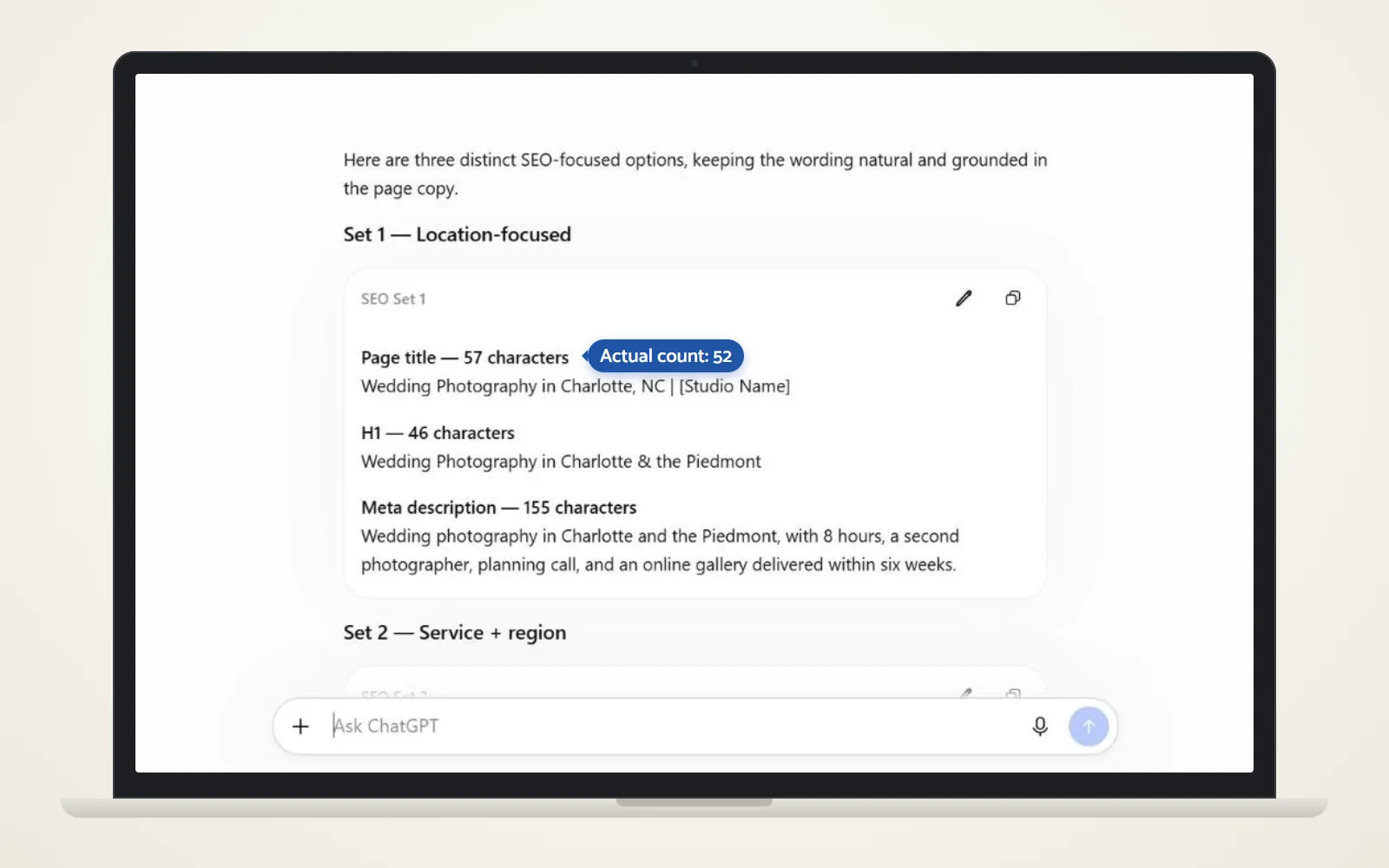
Key idea: Count characters yourself. Paste each title into a character counter or a spreadsheet cell with the LEN formula before you choose one.
The ranges are writing targets. Google writes its own title links and snippets and may pull other text from your page, so what appears in search can differ from what you saved.
Prompt 5: Write alt text and file names for portfolio images
Use this prompt with photographs you upload to ChatGPT or with descriptions you have checked yourself. Add the venue name and other context separately, since ChatGPT cannot identify a venue or a couple from an image. Google’s image SEO guidance recommends descriptive file names and alt text that describes the image in the context of the page, and it warns against stuffing alt text with keywords.
Help me prepare website text for the attached wedding photographs or the image descriptions below.

Image numbers: [number each image]
Confirmed context: [venue, city, event type, and other relevant facts]
Page purpose: [portfolio, real wedding post, or another use]
Image descriptions if no images are attached: [describe each image]

For each informative image, suggest a short descriptive file name and concise alt text based on what is visible and the context I confirmed. Suggest a caption only when it adds information the alt text does not.

Describe each scene naturally. Do not guess at identities, relationships, emotions, or locations I have not confirmed. Use the venue name only when it is relevant to the image and the page. Flag images that may be decorative so I can decide how to handle them.
Compare every suggestion with the photograph. “Couple sharing their first dance beneath string lights at an outdoor reception” gives a clear picture of the scene, and adding the venue and city tells search engines where it happened. The SEO Ready™ Image SEO Cheat Sheet walks through a consistent image workflow for your whole portfolio.
Bonus ChatGPT prompts for wedding photographers
These four prompts pick up where the first five leave off. The 2023 version of this post included prompts for FAQs, album sales, and wedding day timelines. Each one still earns a place with more facts supplied and clear limits on what ChatGPT may invent. The last prompt checks any draft against your notes before you publish.
Bonus prompt 1: Write an FAQ section for a services page or venue guide
An FAQ section answers the questions couples ask before they inquire. In 2023 I asked ChatGPT to write five FAQs about a venue, and it returned questions about capacity, catering, and vendor rules with no reliable way to answer them. This version asks ChatGPT to organize answers you already have.
Write an FAQ section for this page on my wedding photography website.

Page type and topic: [services page, venue guide, etc.]
Questions couples ask me: [paste questions]
My answers: [paste my answers, in rough notes if needed]
Facts I have confirmed with the venue: [details, or "none"]

Choose the five to seven questions most useful to a couple deciding whether to book. Write each question the way a couple would ask it, and write a direct answer of two to four sentences using only my answers and confirmed facts. Mark any question I have not answered as [needs answer] instead of writing one.
Note: Google shows FAQ rich results only for well known government and health websites, so an FAQ will not add an expanded listing for a photography business. Write it for the couples reading the page.
Bonus prompt 2: Draft a wedding album page for past clients
An album page gives past clients a clear place to see album options and order before an offer ends. The original post used a five part structure for this page, and it still works: prepare the reader, show you understand them, explain the album, make the offer, and give the next step. When I ran the companion email prompt in 2023, ChatGPT claimed “our satisfied customers have left us glowing reviews” with no reviews in the prompt, so this version rules out invented proof.
Write a wedding album page for my website, aimed at couples whose weddings I photographed.

Album name and description: [from my album lab]
Features: [list]
Sizes, papers, and cover options: [list]
My offer: [credit, deadline, and terms]
Real client reviews about albums: [paste word for word, or "none"]
Button text: [example: Order Your Album]
Writing sample: [paste a sample]

Organize the page in five parts: prepare the reader for what follows, show that I understand why couples want an album, explain the album and its features, present my offer and deadline, and invite the couple to order. Use a friendly, professional tone.

Use only the details above. Quote reviews exactly as supplied and include none if I supplied none. Do not invent features, guarantees, discounts, or deadlines.
Check the offer terms and deadline against your contract and price list before the page goes live.
Bonus prompt 3: Prepare a wedding day photography timeline
A timeline draft helps you organize a planning conversation with a couple or their planner. When I ran the original timeline prompt in 2023, ChatGPT labeled its schedule a 10 hour timeline but ran it from noon to 9:30 PM, and it blocked two hours for family photos it had estimated at one hour. This version asks ChatGPT to show its math.
Draft a wedding photography timeline using the confirmed details below.

Coverage start and end: [times]
Ceremony and reception times: [times]
Sunset time: [time]
Locations and estimated travel: [details]
Photo groups and portrait sessions requested, with time needed for each: [details]
Other confirmed events and constraints: [details]

Create a table in time order with start time, end time, activity, location, and photographer coverage. Calculate the total coverage time and the total time for family photos, and show the math. Flag overlaps, missing travel time, and activities that fall outside coverage. Mark missing details for confirmation. Add buffer time where it is justified and explain each assumption.
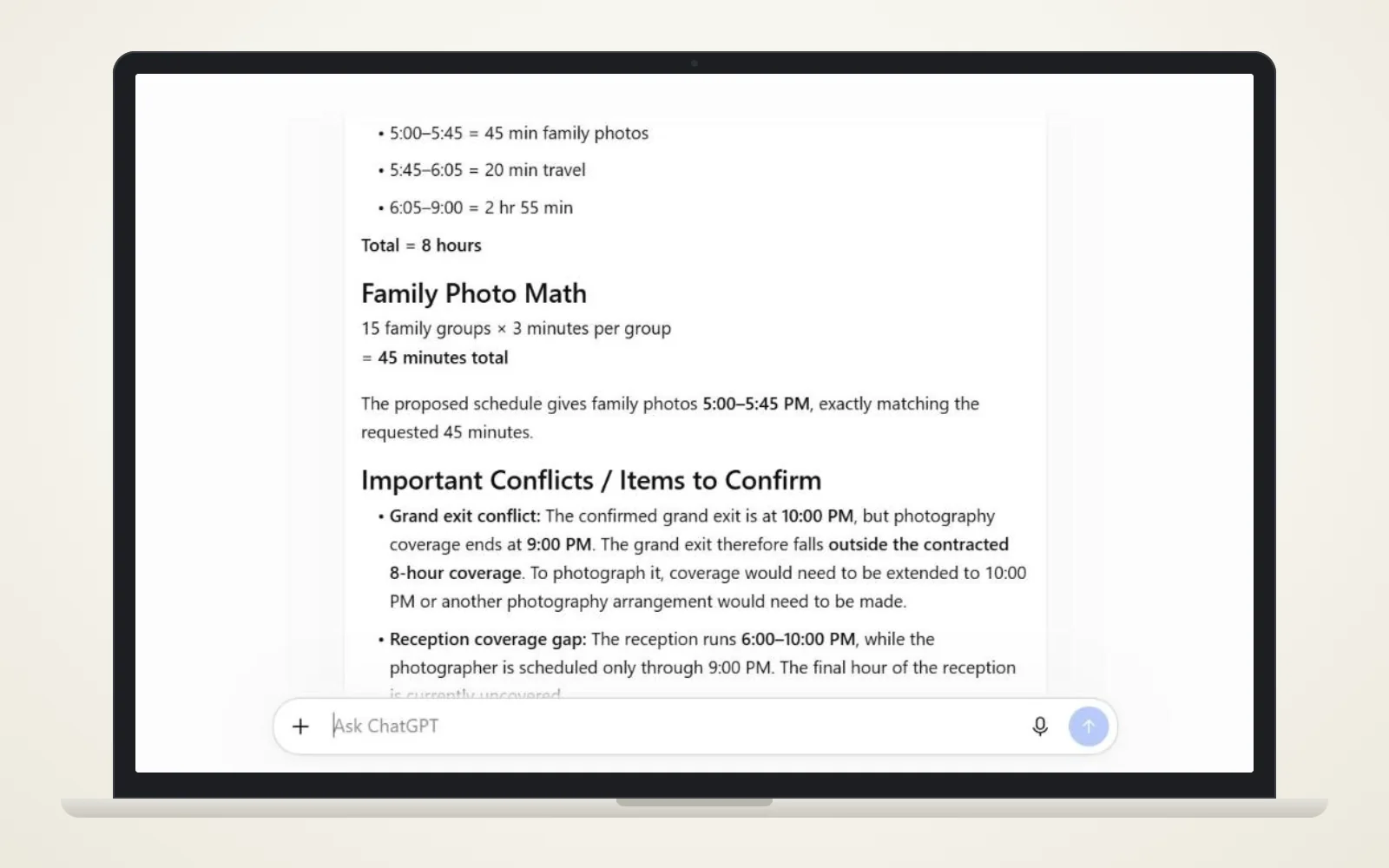
I tested this version with 8 hours of coverage ending at 9:00 PM and a sparkler exit at 10:00 PM. ChatGPT showed the family photo math (15 groups at 3 minutes each, 45 minutes) and flagged that the grand exit falls outside the booked coverage.
Before you share a timeline:
- Check the math and the travel estimates yourself.
- Confirm the sunset time for the wedding date and location.
- Confirm the schedule fits the booked coverage and the venue’s rules with the couple and planner.
Bonus prompt 4: Check any draft against your source notes
Use this prompt as the last step before you publish anything ChatGPT helped write. It finds statements that need attention, and you decide what is true.
Compare this draft with my source notes.

Draft: [paste draft]
Source notes: [paste confirmed facts]
Approved website URLs: [paste URLs]

List every factual statement that is unsupported, inconsistent with my notes, or missing important context. Point out generic sentences that I could replace with my own experience. Check that every link matches an approved URL. Give me a short revision list, and leave uncertain facts flagged for my review.
How wedding photographers can use ChatGPT in their business: 50 ideas
The prompts above cover your website. ChatGPT also helps with the daily work that brings in bookings, referrals, and repeat clients. Each idea below starts with the same rule as the prompts: give ChatGPT your real details and review the result before it reaches a client.
Inquiries and consults
- Draft a first reply to a new inquiry that answers the couple’s questions and offers consult times.
- Write a three email follow up sequence for couples who go quiet after receiving your price guide.
- Turn your consult notes into a recap email that restates the couple’s priorities and the collection you recommended.
- Build a list of consult questions that uncover a couple’s priorities, guest count, and timeline.
- Practice answers to price questions by asking ChatGPT to play a couple comparing photographers.
- Write a kind reply for dates you have already booked, with a referral to a photographer you trust.
- Summarize a long inquiry email into the facts you need for your client management system.
- Write a reply for elopement inquiries that explains your elopement collections.
- Draft an out of office reply for wedding weekends that tells couples when to expect an answer.
- Compare two versions of your price guide introduction and explain which one reads more clearly.
Client communication
- Write a welcome email that explains what happens after a couple signs and pays the retainer.
- Create an engagement session questionnaire that asks about locations, outfits, and the couple’s story.
- Draft a wedding day questionnaire that collects family names, vendor contacts, and must have moments.
- Build a family photo list template couples can fill in and return.
- Write an engagement session guide that covers outfits, timing, and what to bring.
- Draft reminder emails for final payments and questionnaire deadlines.
- Write a gallery delivery email that explains downloading, printing, and sharing the images.
- Draft a sneak peek message to send the couple the day after the wedding.
- Turn the answers you give most often into an FAQ page for your welcome guide.
- Write a rain plan explainer couples receive one month before the wedding.
Reviews, referrals, and vendor relationships
- Write a review request email that tells couples where to leave a review and which details help other couples.
- Draft a thank you note to a planner who referred a couple to you.
- Write an email offering images to the vendors from a wedding, with credit and usage terms.
- Create a vendor credit template you fill in for every gallery you share.
- Draft an introduction to a venue coordinator who manages a preferred vendor list.
- Write a note to include with a thank you gift for past clients who send referrals.
- Plan a styled shoot brief to share with vendors you want to work with.
- Write a follow up email after a networking event or bridal show.
- Pull the strongest excerpt from a long client review, quoted word for word, and ask the couple’s permission to use it.
- Draft survey questions that help couples write detailed testimonials.
Social media and email marketing
- Plan a month of Instagram posts from one wedding gallery.
- Write Instagram captions in your voice from your notes on each image.
- Draft Pinterest pin descriptions for a real wedding gallery.
- Write a monthly newsletter for engaged couples and past clients.
- Outline a welcome email sequence for people who download your wedding planning guide.
- Turn one blog post into five social media posts.
- Brainstorm short video ideas that show how you work on a wedding day.
- Write a short bio for vendor directories, podcast features, and guest posts.
- Draft an announcement for holiday mini sessions.
- Write an anniversary session offer for couples whose weddings you photographed.
Offers, pricing, and operations
- Compare your collections and point out overlaps that could confuse couples.
- Draft an album upgrade email for past clients, using the album page prompt above as a starting point.
- Write a print and wall art guide to include with gallery delivery.
- List every task in one wedding, from consult to album delivery, and add up the hours to check your pricing covers your time.
- Plan which services to promote in each season of the year.
- Paste a spreadsheet of past inquiries and ask which referral sources sent the most bookings.
- Write an onboarding guide for second shooters that covers your shot list and editing style.
- Draft a job description for an assistant or associate photographer.
- Plan a marketing calendar around the holiday engagement season, when many couples start their search.
- Write a plain language summary of your contract for couples, then have your attorney review it.
Key idea: Save the prompts that work as templates in a document you keep open. Reusing a tested prompt saves more time than writing a new one for every inquiry.
Check ChatGPT’s search suggestions with SEO tools
ChatGPT has no access to your search data. It cannot see which searches already bring couples to your website, how often couples search a phrase in your area, or whether Google has indexed a page. Free SEO tools answer those questions.
- Open the Performance report in Google Search Console and read the queries for the page you plan to update. Our guide on using Google Search Console to refine keywords walks through the report.
- Paste those queries into Prompt 1 so ChatGPT plans around real searches.
- Check ChatGPT’s suggested phrases in Google Keyword Planner for rough search volume ranges.
- Publish the page, then check Search Console again after a few weeks to see whether it appears for the searches you planned.
Our list of free SEO tools every wedding photographer needs covers these tools and several more, including PageSpeed Insights for slow galleries.
Common questions about ChatGPT for wedding photographers
Does Google penalize content written with ChatGPT?
Google evaluates content on whether it is helpful and accurate, however it was produced. Its spam policies target pages produced at scale without adding value. A real wedding post built from your notes and edited in your voice fits Google’s guidance. Dozens of venue pages generated from a list of names do not.
Can ChatGPT do keyword research for my photography website?
ChatGPT can suggest phrases couples might search and group them by topic. It cannot report reliable search volume or tell you which searches your site already appears for. Treat its suggestions as a list to check in Search Console and Keyword Planner.
Should I paste client details into ChatGPT?
Paste only the details a task needs and the couple has approved for public use. Review your ChatGPT data controls to decide whether your conversations are used to train OpenAI’s models.
Is the free version of ChatGPT enough for these prompts?
I ran the prompts in the screenshots above in ChatGPT without signing in, and the free version handled each one. Uploading photographs for Prompt 5 requires a free account, which also saves your chat history so you can reuse prompts.
Bring your questions to a website consultation
Start with one page and one goal. Gather your facts, run the prompt that fits, and edit the result until it reads like your business. Write down the questions the process raises, such as which topics to choose, how to organize your services pages, or why a page gets visitors and few inquiries.
Those questions make a useful starting point for an SEO consultation. At Morris & Co. Marketing, I work with wedding photographers on website design and SEO, and the entity SEO approach for photographers shapes how I plan their content. Request a consultation and send your website, the weddings you want to book, and the pages you want to improve.


