





Estimated reading time: 5 minutes
Originally published August 18, 2022.
10 Free SEO Tools Every Wedding Photographer Needs
Ten free tools can show you how couples find your wedding photography website, which searches are worth writing about, and what slows your pages down. Each one answers a specific question, and each answer points to a specific fix: a clearer services page, a lighter gallery, or a broken link to repair.
I spent nearly a decade as a destination wedding photographer before I founded Morris & Co. Marketing, and these are the free tools I still use in client work today. Every tool here has a free version you can keep using without a subscription. A few need an account or a verification step, and I note those limits so nothing surprises you.
The 10 tools at a glance
- Google Search Console: see the searches that show your website
- Google Analytics 4: see which pages lead to inquiries
- Google Business Profile: control how you appear on Google Maps
- Google Keyword Planner: find the phrases couples search
- Google Trends: see when wedding searches rise and fall
- PageSpeed Insights: find what slows your galleries down
- Screaming Frog SEO Spider: catch broken links and missing titles
- HeadingsMap: check the heading outline of a page
- META SEO inspector: confirm what a live page publishes
- Rich Results Test: check your structured data
Tools that show how couples find your website
1. Google Search Console
- Use it to: see which searches show your website and which pages earn clicks
- Cost and setup: free; you verify that you own the website before data appears
Google Search Console reports the searches where your website appeared and the clicks it earned. It also lists which pages Google has indexed and flags the pages it could not crawl. Set this tool up first, because it measures the results of every other change you make.
Key concept
An impression counts each time your site shows up in search results. A click counts each time someone chooses it. A page with many impressions and few clicks is showing up without getting chosen.
To see what one page shows up for:
- Open the Performance report.
- Choose one page, such as a venue blog post.
- Read its queries. The post might appear for “[venue name] wedding,” for “[venue name] wedding photographer,” or for searches that have nothing to do with your work.
- Compare that list with what couples ask about the venue, and update the post so it answers those questions.
Search Console now includes a generative AI performance report, which Google rolled out to all sites on August 31, 2026. It counts how often your pages appeared in AI Overviews and AI Mode, broken down by page, country, device, and date. For now it shows impressions only, with no click or query data. Our guide to the latest Google Search changes explains how to read this report next to your analytics and inquiries.
For a full walkthrough of the reports, read How to Use Google Search Console to Refine Keywords.
2. Google Analytics 4
- Use it to: see what visitors do after they arrive and which pages lead to inquiries
- Cost and setup: the standard version is free; you add a tracking tag to your website
Google Analytics 4 (GA4) shows the page each visitor entered on, where they came from, and where they went next.
Key concept
GA4 calls important actions “key events.” For a wedding photographer, the key event that matters most is a submitted inquiry.
To track inquiries:
- Mark your contact form submission as a key event.
- Send yourself a test inquiry.
- Confirm the report records it before you trust the numbers.
Forms embedded from a client management platform often need extra setup before GA4 can see a completed submission, so the test in step 2 matters.
Once tracking works, compare the pages that bring in visitors with the pages that lead to inquiries. If a styled shoot post draws steady traffic and no one clicks through to your investment page, add a clear link from that post to the next step. GA4: A Guide to Google Analytics 4 for Photographers covers the setup in more detail.
3. Google Business Profile
- Use it to: control how your business appears on Google Maps and in local search results
- Cost and setup: free; Google verifies your business before the profile goes live
Google Business Profile lets you list your website, phone number, services, photos, and client reviews.
Service area rule
Most wedding photographers travel to their clients, so Google treats them as service area businesses. If couples do not visit you at your address, remove the address and list up to 20 service areas within about two hours’ drive of your base.
That limit matters if you photograph destination weddings. Your profile covers your home market, and your website carries everything farther away: venue posts, location pages, and galleries from the places you want to book. As a photographer, I booked weddings from Charleston and Savannah up to Boston and Newport, and as far as Aruba. A Maps listing could never stretch that far, so the website pages did that work.
To keep your profile complete:
- Use your real business name.
- Keep the website link current.
- Add photos of the weddings you want more of.
- Ask each couple for an honest review after you deliver their gallery.
5 free Google Business Profile benefits for wedding photographers explains what a complete profile includes and how to set one up.
Tools for choosing what to write about
4. Google Keyword Planner
- Use it to: find keyword ideas and estimated monthly searches from Google’s own data
- Cost and setup: free to use; requires a Google Ads account with billing information entered, and no active campaign
Google Keyword Planner was built for advertisers, and it works just as well for planning pages and blog posts.
To research a service:
- Enter your service and market, such as “Charleston wedding photographer” or “Charleston elopement photographer.”
- Set the location to the area you serve.
- Compare the ideas against the work you want to book. A broad phrase may get more searches, while a specific phrase describes your work more accurately and attracts couples who want that kind of wedding.
Read the competition column carefully
It describes advertisers bidding on ads, so it tells you little about how hard a phrase is to reach in regular search results.
Phrases with very few searches may not appear at all.
5. Google Trends
- Use it to: see when interest in a search term rises and falls
- Cost and setup: free; no account needed
Google Trends compares interest in search terms over time and across places. Wedding searches follow the seasons, and Trends shows you when they rise.
To plan content around the seasons:
- Compare “elopement photographer” and “wedding photographer” in the United States over five years.
- Note the months when each one climbs.
- Hold those patterns up against your own inquiry calendar.
- Publish ahead of the rise. If interest in your area jumps right after the winter holidays, publish a new venue guide or pricing FAQ in the fall so the page is indexed before couples start searching.
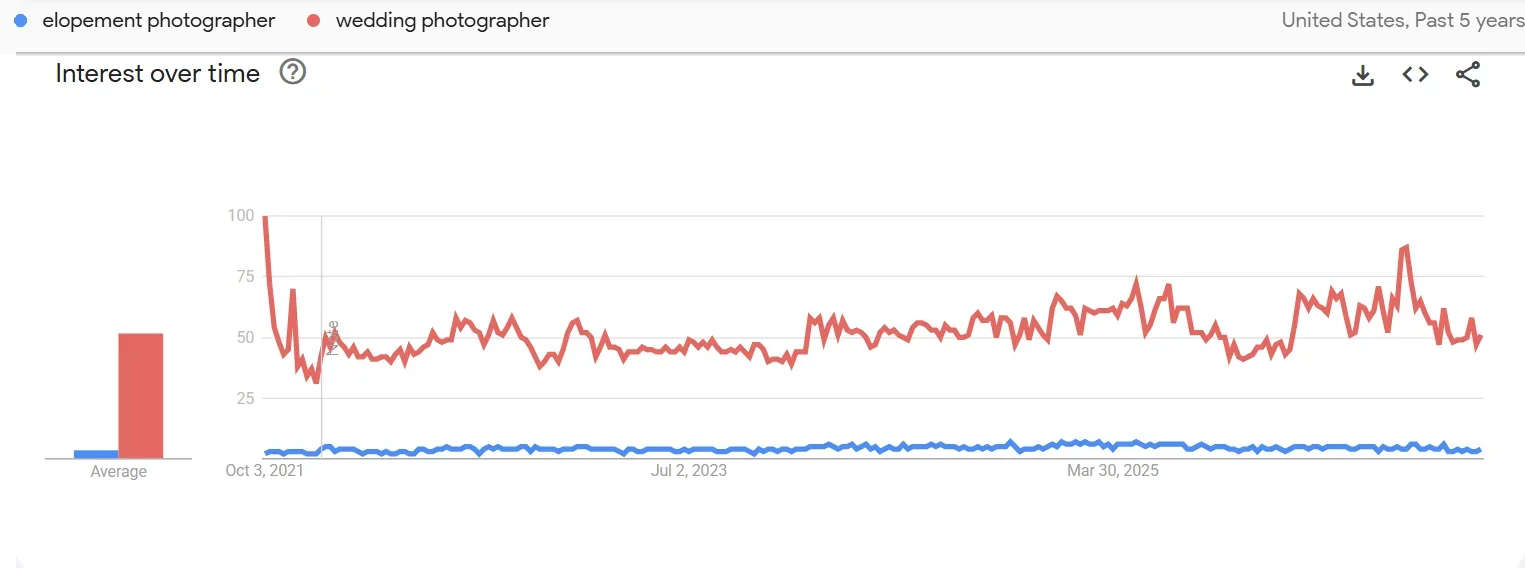
Search interest for “wedding photographer” and “elopement photographer” in the United States over five years. Scores are relative, and 100 marks the peak.
Key concept
Trends scores interest from 0 to 100 relative to the terms and time range you chose. A score of 100 marks the peak within your comparison and does not count searches.
Very specific local phrases often lack enough data to chart.
Tools for checking your website
6. PageSpeed Insights
- Use it to: find what slows a page down on mobile and desktop
- Cost and setup: free; no account needed
PageSpeed Insights tests a page and lists what slows it down. Large images cause most of the speed problems I see on photography websites, and full galleries are the worst offenders.
Test three pages, because each one loads differently:
- Your homepage
- Your main services page
- A full wedding gallery or blog post
A gallery with sixty photos behaves very differently from a homepage with five.
Field data and lab data
Field data comes from real Chrome visitors over the last 28 days. Lab data comes from a simulated test and is available for any page. Smaller websites often have no field data yet.
Field data grades three measurements called Core Web Vitals:
- Largest Contentful Paint measures how fast the main content appears. Good is 2.5 seconds or less.
- Interaction to Next Paint measures how fast the page responds to a tap or click. Good is 200 milliseconds or less.
- Cumulative Layout Shift measures how much the layout jumps while it loads. Good is 0.1 or less.
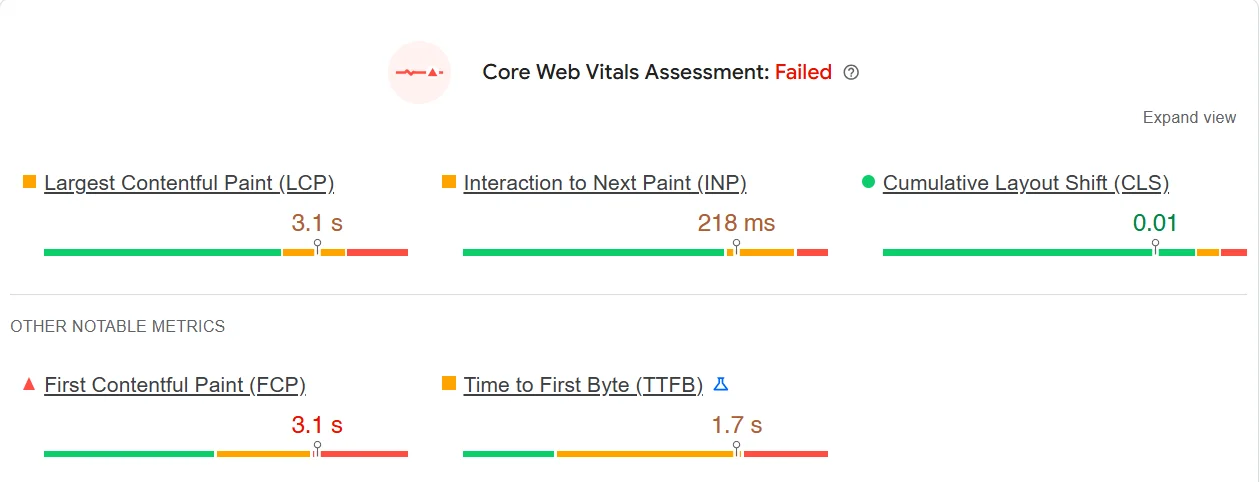
A sample PageSpeed Insights report. Two of the three Core Web Vitals miss the “good” threshold, so the assessment fails.
To fix a slow page:
- Use the lab results to find one problem.
- Fix it.
- Test the same page again.
If you build in Showit, the Photographer’s Guide to Showit Image Optimization walks through image sizing and export settings.
7. Screaming Frog SEO Spider
- Use it to: crawl your website and find broken links, redirects, and missing titles
- Cost and setup: free desktop program that crawls up to 500 URLs at a time; a paid license removes the limit and adds saved crawls and advanced settings
Screaming Frog SEO Spider crawls your website the way a search engine does. It reports broken links, redirects, page titles, meta descriptions, and headings in one table. The 500 URL limit covers most photography websites.
Run a crawl after you redesign, rename pages, or retire old packages. A wedding post from five years ago might still link to an investment page you deleted last year.
To keep the report short and useful:
- Run the crawl.
- Filter for broken internal links and point each one at a current page.
- Filter for missing or duplicate page titles and write a unique title for each page.
12 Wedding Photography Website Mistakes covers other problems a crawl can surface.
8. HeadingsMap
- Use it to: see the heading outline of any page
- Cost and setup: free Chrome extension
HeadingsMap shows a page’s headings as an outline. Open it on your wedding photography services page and read the outline as a list. It should name the service clearly and walk through your approach, coverage, collections, and booking process.
The words in your headings matter as much as their levels. “Wedding Photography Collections” tells a couple and a search engine more than “The Details.”
Key concept
Text that looks like a heading may not be one. Website builders like Showit let you style any text to look like a heading, so a line can look like a heading on screen while the page code treats it as a paragraph. HeadingsMap shows you what the code says.
How to Use Showit Header Tags Like an SEO Pro explains how to set them correctly.
9. META SEO inspector
- Use it to: see the title, meta description, canonical URL, robots instructions, and structured data a live page publishes
- Cost and setup: free Chrome extension
Open META SEO inspector on a new venue post right after you publish and confirm three things:
- The post has its own descriptive title.
- Its canonical URL points to itself.
- No “noindex” instruction blocks it from search.
Key concept
Your editor shows what you entered. The extension shows what your website delivers, and the two do not always match.
10. Rich Results Test
- Use it to: check the structured data on a page and see which Google search features it supports
- Cost and setup: free; no account needed
What structured data is
Structured data labels facts about a page, such as its author, headline, and publish date, in a format search engines read directly.
To check your markup with Google’s Rich Results Test:
- Run the test after you add or change markup.
- Fix any errors it reports.
- Make sure the labeled facts match what the page shows.
- If your platform or an SEO plugin already adds markup, check that output before you add more, so the page does not carry two conflicting versions.
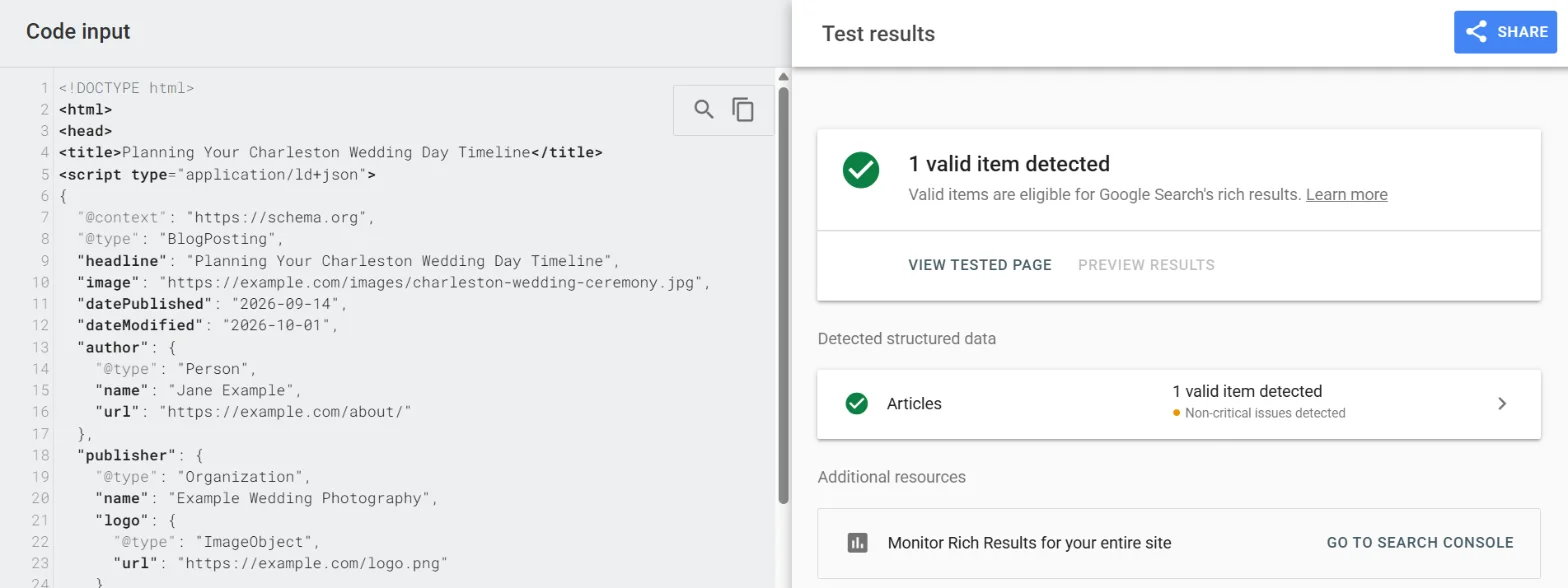
Sample BlogPosting markup for a fictional photographer passes the Rich Results Test as a valid Articles item.
A passing test means Google can read your markup, and Google still decides whether to show the page with those features. To check Schema.org markup that Google does not use for search features, try the free Schema Markup Validator. Entity SEO for Photographers explains how structured data helps search engines understand who you are and what you photograph.
More free tools worth bookmarking
These three tools fill gaps the main list leaves open:
- AnswerThePublic collects the questions people type about a topic. The free plan allows three searches a day, enough to build a question list for a blog post or FAQ section.
- Bing Webmaster Tools works like Search Console for Bing. Its AI Performance report, in public preview since February 2026, shows when Microsoft Copilot cites your pages.
- Squoosh is a free image compressor from Google Chrome Labs. It runs in your browser, so your photos stay on your computer while you shrink them before upload.
Frequently asked questions about SEO tools for wedding photographers
Do wedding photographers need paid SEO tools?
Most do not when they start. Search Console, GA4, and PageSpeed Insights cover your visibility, your inquiries, and your page speed at no cost. Paid suites add competitor research and keyword difficulty scores, which become useful once your basic setup works and you want to compare your website against other photographers in your market.
Which SEO tool should a wedding photographer set up first?
Set up Google Search Console first. Verification takes a few minutes, and the tool starts collecting the data every later decision depends on. Search Console keeps 16 months of history, so an earlier start gives you more to compare against.
How often should I check these tools?
Review Search Console and GA4 once a month. Run PageSpeed Insights, Screaming Frog, and the Chrome extensions whenever you publish a new page, redesign your website, or change your navigation.
Bring your findings to an SEO consultation
Work through the tools in this order:
- Start with Search Console to see where you stand.
- Review GA4 once your inquiry tracking works.
- Use the other tools to look into a specific problem, such as a slow gallery or a broken link.
Keep a short log as you go:
- The page you checked
- What you found
- What you changed
That log gives a consultation a clear starting point. If you want help deciding what to fix first, explore Morris & Co. Marketing’s SEO services or book an SEO consultation. Bring your website address, the places where you want to book weddings, and the kinds of weddings you want more of, and we will start from your goals.
Research sources
Tool features, limits, and access requirements were checked in October 2026 against the official product pages linked above and this documentation:


