




Estimated reading time: 3 minutes
Originally published March 9, 2023.
How to Get Google to Crawl Your Showit Site
Getting Google to crawl your Showit site is fundamental to SEO. Without crawling, pages cannot be indexed, and without indexing, your content cannot rank. This guide covers the practical steps to ensure Googlebot visits your site regularly and indexes all your pages.
In This Guide
- What Crawling Does
- How to Submit Your Showit Sitemap
- Using the URL Inspection Tool
- Requesting Recrawls
- How Often to Request Recrawls
- Monitoring Googlebot Visits
- Recrawl vs. Indexing Requests
- Why Recrawling Matters for SEO
- Video Tutorial
- Key Takeaways
What Crawling Does
Google crawling means Googlebot visits your website and reads your pages. During crawling, Googlebot gathers information about page content, structure, and links. This information feeds into Google’s indexing process. Indexed pages can appear in search results when relevant queries are made. A well-crawled site has better visibility in search results.
Without crawling, new pages remain invisible to Google. Updated content on existing pages does not get recognized. Broken links and structural problems go undetected. Crawling is the first step in SEO. Everything else depends on it.
How to Submit Your Showit Sitemap
A sitemap is a file listing all the pages on your website. An XML sitemap tells Googlebot which pages exist and when they were last updated. Submitting your sitemap to Google Search Console accelerates crawling. Googlebot learns about all your pages faster and can prioritize crawling based on the information in your sitemap.
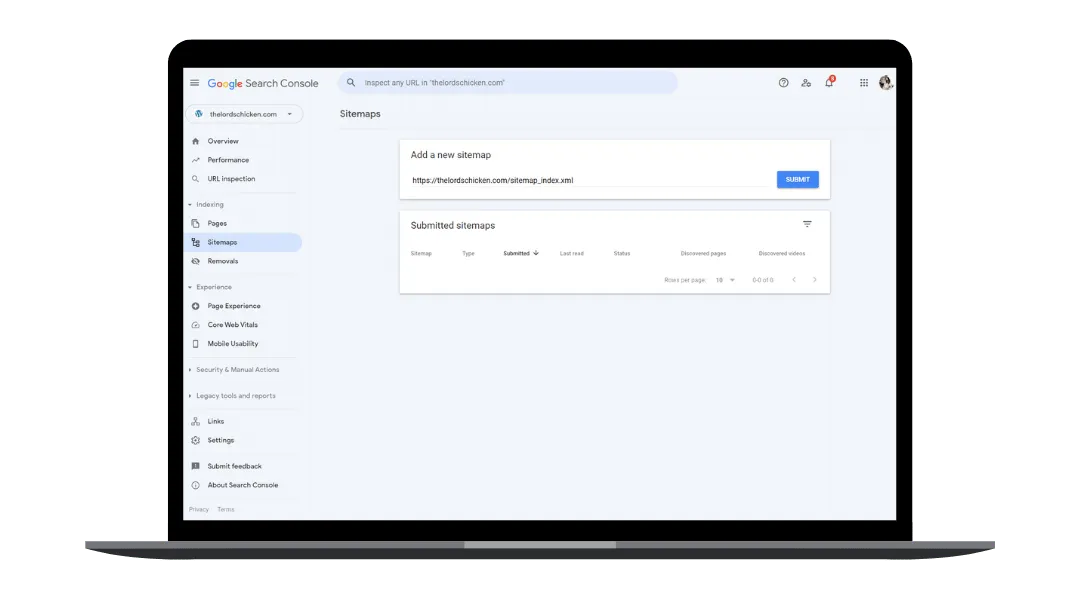
To submit your Showit sitemap:
- Log into Google Search Console for your domain
- Navigate to Sitemaps in the left menu
- Enter your sitemap URL (typically yoursite.com/sitemap.xml)
- Click Submit
Update your sitemap whenever you add new pages or remove old ones. Resubmit it through Search Console to notify Google of changes.
Using the URL Inspection Tool
The URL Inspection tool in Google Search Console shows you exactly what Google knows about each page on your site. It reveals whether a page is indexed, when it was last crawled, and what issues prevent indexing.
To inspect a URL:
- Open the URL Inspection tool in Google Search Console
- Paste the full URL of the page you want to check
- Review the inspection report
The report displays the crawl date, whether the page is indexed, and any crawl errors. If crawling failed, the tool describes the issue. Common problems include redirect chains, server errors, noindex tags, or blocked resources.
This tool also lets you request Google to recrawl a specific page immediately. After making changes to a page, use URL Inspection to request a recrawl within hours rather than waiting days.
Requesting Recrawls
Requesting a recrawl tells Google to revisit a page and process any changes. When you update page content, fix technical issues, or launch new pages, request a recrawl to accelerate indexing.
Use the URL Inspection tool to request recrawls for individual pages. For bulk changes across your site, resubmit your sitemap. Google prioritizes sitemap submissions and processes them within days.
Recrawl requests are processed within 2-4 weeks on average. The timeline depends on your site size, crawl budget, and content change frequency. Competitive keywords may see faster updates. Simple content changes on established sites see slower movement.
How Often to Request Recrawls
Request a recrawl immediately after substantial page changes such as updating titles, rewriting meta descriptions, adding content, changing URLs, or fixing structural issues. Do not request recrawls for minor edits like fixing typos.
Beyond immediate recrawls, submit your sitemap every 6-12 months even if no changes were made. Regular sitemap submissions keep Google informed about your site structure.
Avoid requesting recrawls too frequently. Excessive recrawl requests do not accelerate indexing and waste your crawl budget. Let Google crawl naturally between deliberate requests.
Monitoring Googlebot Visits
Track when Googlebot visits your site using multiple methods:
Google Search Console displays crawl statistics in the Performance report. You see how often Googlebot accessed your site, which pages were crawled, and how many pages are indexed. Check this report monthly to confirm crawling is occurring.
Server logs contain detailed Googlebot visit records. The IP address 66.249.64.0/19 identifies Googlebot traffic. Review logs to see exactly which pages Googlebot visited and when. This data confirms recrawl requests were processed.
Google Analytics shows Googlebot traffic as a bot under Audience. Filter for “Googlebot” to see visits by date and page. An uptick in Googlebot visits after a recrawl request indicates Google processed your request.
Recrawl vs. Indexing Requests
Recrawling and indexing are distinct processes. Recrawling means Google revisits a page to check for changes. Indexing adds page content to Google’s search index for ranking.
Request a recrawl when you make changes to existing pages. Google already knows the page exists. You want it to see the changes. Request indexing for brand new pages Google has not discovered. The URL Inspection tool handles both actions.
Minor page updates need only a recrawl. Substantial rewrites benefit from a recrawl followed by an indexing request. A new page automatically requires an indexing request.
Why Recrawling Matters for SEO
Recrawling ensures Google sees the most recent version of your pages. Outdated content in Google’s index hurts rankings. Accuracy matters for user trust. Search results should reflect your current business information.
Technical improvements like faster load times, better site structure, or fixed broken links only help rankings after Googlebot crawls them. Optimizing without recrawling means Google ranks an outdated version of your site.
Requesting recrawls is not a ranking boost in itself. It accelerates the visibility of actual improvements you made. The improvements themselves drive ranking gains.
Video Tutorial
Here is a video showing how to submit URLs to Google Search Console.
Key Takeaways
Crawling is the foundation of SEO. Submit sitemaps to tell Google about your pages. Use the URL Inspection tool to monitor crawl status and request recrawls. Request recrawls after significant page changes. Monitor Googlebot visits to confirm requests were processed.
Showit websites need active crawl monitoring like any other site. Showit’s dynamic design system does not exempt sites from crawl requirements. Follow these steps to ensure Google maintains an accurate index of your site.
When you are ready to optimize your Showit site for search engines, consider working with someone who specializes in Showit SEO. Stefanie Morris at Morris & Co helps creative entrepreneurs and independent law firms build SEO-ready Showit websites that generate organic traffic from Google.


