





Originally published March 13, 2023.
Showit Pages & Site Canvases Your Website Needs
Which pages does a Showit website actually need, and which sections belong in site canvases instead of page canvases? This guide names the required Showit pages, the site canvases that make updates fast, explains the difference between the two canvas types, and identifies the three pages that should stay out of Google search results. After structuring Showit websites for creative entrepreneurs and wedding professionals for over a decade, these are the pieces I consider non-negotiable.
The way you structure canvases decides how easy your site is to update and how clearly search engines read it. Get the structure right once, and every future edit gets faster.
Showit Site Canvases Vs Showit Page Canvases
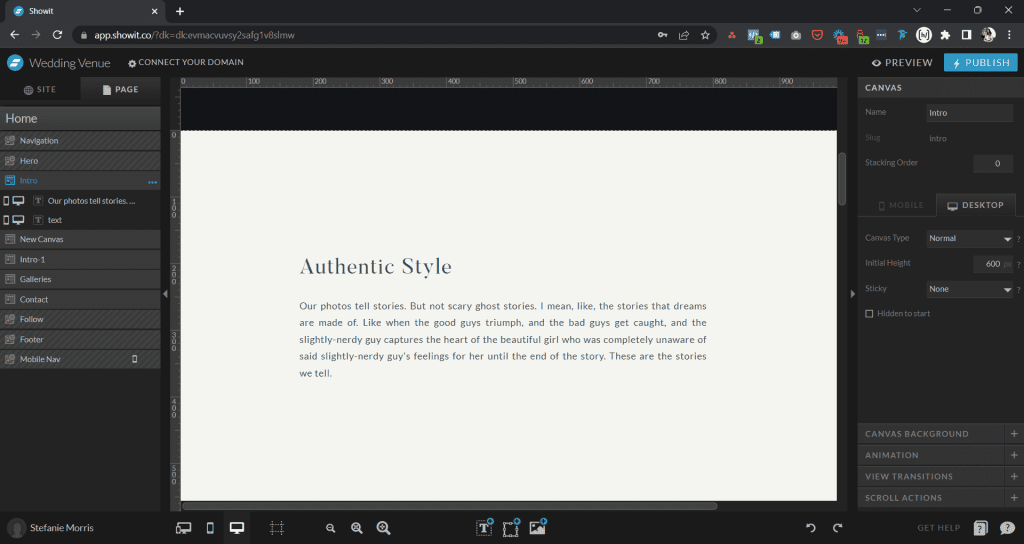
Showit splits every page into canvases, and canvases come in two types. A site canvas appears on every page that uses it. Edit it once, and the change publishes everywhere it appears. A page canvas belongs to one page only, and changes to it stay on that page.
Site canvases carry the repeatable building blocks of your website: headers, footers, navigation, and any section you reuse across pages. Page canvases carry the content that makes each page unique.

The Site Canvases Every Showit Website Needs
A healthy Showit website uses these site canvases:
- Header and Mobile Header
- Footer and Mobile Footer
- Reviews, one for each service or offer
- FAQs, one for each service or offer
- Freebie or opt-in section
Building reviews, FAQs, and freebie sections as site canvases means you update a testimonial or lead magnet once and it changes across the whole site. That structure saves hours over the life of a website and keeps content consistent, which matters for both visitors and search engines.
What Is The Difference Between A Page Canvas And A Page?
A page is the sum of every canvas on it. Your home page, for example, is a stack of canvases: a header site canvas, several page canvases holding the hero, services, and about sections, and a footer site canvas. Click any canvas in the Showit builder and it expands to show the design elements inside it.
The Pages Every Showit Website Needs
- Home
- About
- Contact
- Legal pages: Privacy Policy, Terms and Conditions
- 404
- Thank You
- Instagram Links
- Blog, plus the Blog Single Post and Blog Category templates if you blog
Depending on your business, you may also need Gallery, Services, Locations, Reviews, FAQs, or Pricing pages. Each indexable page is real estate for a keyword set, so add pages when you have a distinct topic or search intent to serve, not just to fill a menu.
Your About page deserves particular attention. Read The Anatomy of a Great About Page for the sections that page needs.
The 3 Showit Pages That Should Be No-Index
Three required pages hold value only for people already on your site, so Google should not index them: the 404 page, the Thank You page, and the Instagram Links page. For each one, open the page in Showit, go to Advanced Settings, and select the option asking Google to ignore the page. If you want a backup, add this meta tag to the page’s custom head code:
<meta name="robots" content="noindex">404 Page
A 404 page displays when a visitor lands on a URL that does not exist. Give it a clear message, a link back to your home page, and a path to your most useful content. Search engines should never index an error page, so mark it no-index.
Thank You Page
A Thank You page confirms a form submission and shows appreciation. It is also your conversion tracking anchor: when your contact form redirects here, analytics can count the visit as a completed inquiry. That only works cleanly if the page is reachable by converted visitors alone, which is another reason to keep it out of search results. If you track conversions with Google Analytics 4, the Thank You page is the trigger; the setup is covered in How To Set Up Google Analytics 4 On Your Showit Site.
Instagram Links Page
Instead of sending Instagram followers to a third party tool like Linktree, build the links page on your own domain. You keep the traffic, the analytics data, and the chance to route visitors to your services and freebies. Since the page exists for social followers, not searchers, mark it no-index.
How Canvas Structure Supports SEO
Search engines read your pages as structured documents. Canvas order shapes the HTML structure Google receives, heading tags inside canvases signal content hierarchy, and consistent site canvases keep navigation identical across pages, which helps crawlers move through your site. Once your pages and canvases are in place, configure the built-in settings covered in How To Use Showit SEO Tools Like An SEO Pro and check your heading structure against How To Use Showit Header Tags Like An SEO Pro.
Next Steps For A Healthy Showit Website
Start with a template designed by an SEO professional, so the page and canvas structure is built for search from day one. Request an SEO audit to see how your current structure performs. Or work with a Showit SEO expert and website designer if you are building from scratch or relaunching.
Questions about your Showit site structure? Visit the MoCo.Marketing contact page and let’s map out the right pages for your business.


